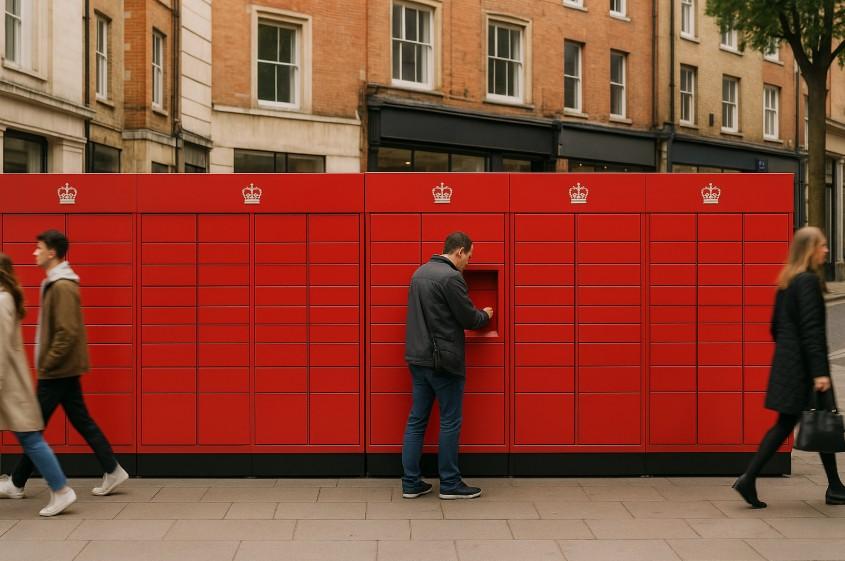
Ever wished you could drop off or return a parcel without queuing at the Post Office or rushing to meet business hours? Royal Mail Parcel Lockers are the modern solution to those everyday delivery struggles. With 24/7 access and thousands of locations across the UK, these self-service lockers give you the freedom to post or return parcels on your own schedule.
Whether you’re sending items for your small business, returning online shopping, or simply avoiding queues, Royal Mail Parcel Lockers offer unmatched convenience.
These lockers have been carefully designed to fit into your daily routine, no matter your lifestyle. Positioned at easily accessible places like supermarkets, petrol stations, and retail parks, they’re open around the clock.
In this guide, you’ll learn everything you need to know about using Royal Mail Parcel Lockers, from locations to services, locker sizes to troubleshooting, so you can send smarter.
What Are Royal Mail Parcel Lockers and Why Should You Use Them?

Royal Mail Parcel Lockers are secure, self-service units that allow you to drop off parcels and returns 24 hours a day, 7 days a week. Designed to give you more control over how and when you send items, these lockers are perfect for people with busy lives or those looking for contactless options. Whether you’re an online seller, a shopper making returns, or someone simply trying to avoid queues, parcel lockers make your life easier.
Here’s why people across the UK are increasingly using them:
- Open 24/7: Most lockers are accessible at any time, even outside standard business hours
- Convenient locations: Available at supermarkets, petrol stations, shopping centres, and more
- Fast and contactless: Avoid long waits and handle your postage securely
- No queues: Simply scan your label and drop off
- Ideal for returns: Many retailers now accept Royal Mail returns through lockers
By cutting out the need to stand in line or wait for collection, parcel lockers save time and hassle. If your parcel meets the size and service requirements, you can manage your delivery experience completely on your own terms.
With thousands already in operation and more being added regularly, there’s likely a Royal Mail Parcel Locker near you right now waiting to make your postal tasks much simpler.
Where Can You Find Royal Mail Parcel Lockers in the UK?
If you’re wondering how close you are to the convenience of a parcel locker, the good news is that Royal Mail is rapidly expanding its network across the UK.
These lockers are available in over 1,500+ locations and counting, often placed in areas where people shop or travel regularly. From bustling city centres to suburban supermarkets, finding one nearby is easier than ever. You can locate your nearest locker using the “Services Near You” tool on Royal Mail’s website.
Here’s how to find one:
- Visit the Royal Mail website and go to “Services Near You”
- Enter your postcode in the search bar
- Toggle the filter to ‘Postbox’, where you’ll see red icons indicating locker locations
- Look for the small locker symbol which represents the Royal Mail Parcel Locker
You’ll find these lockers in the following types of locations:
- Supermarkets
- Retail parks
- Petrol stations
- Shopping centres
- Convenience stores
Many are placed strategically in high-footfall areas, allowing for both pedestrian and vehicle access. Whether you’re popping out for groceries or commuting to work, you can fit your drop-off into your routine without any detour.
With lockers appearing in new areas regularly, checking Royal Mail’s online map ensures you stay up to date with the latest locations.
How Do Royal Mail Parcel Lockers Work?
Using Royal Mail Parcel Lockers is incredibly straightforward. Whether you’ve never used one before or you’re a returning user, the process is designed to be intuitive and accessible. In just a few steps, you can securely drop off your parcel and be on your way. Let’s break down the steps and key features.
Buy Postage, Print Label, Drop Off
To begin, you’ll need to buy your postage online using Royal Mail’s Click & Drop service:
- Go to Royal Mail’s website and purchase your postage
- Print your label at home or choose to print it at the locker
- Attach the label to your parcel securely
- Use the “Services Near You” tool to locate your nearest locker
- Head to the locker and follow the screen instructions
- Scan the label’s barcode to unlock the locker
- Place your parcel inside and close the door securely
Overview of on-screen Instructions at Lockers
The locker interface is simple to use:
- Begin by scanning your parcel’s barcode
- Follow the prompts to confirm your drop-off
- If there’s an issue with scanning, some models allow you to manually enter your barcode
- The screen will then open a suitable locker door for your parcel size
- A confirmation screen will appear once your parcel is securely inside
Use With or Without a Printer (QR Code Option)
If you don’t have access to a printer:
- Choose “label-free” during postage purchase
- You’ll receive a QR code
- At the locker, scan the QR code
- The system will print your label on-site and allow you to proceed
This flexibility makes parcel lockers a go-to option, whether you’re tech-savvy or simply looking for a fuss-free experience.
What Services Can You Use with Royal Mail Parcel Lockers?

Royal Mail Parcel Lockers support a wide range of services, making them highly versatile. Whether you’re sending a gift to a friend or returning a product to a retailer, the available postage options are extensive.
You just need to ensure your item meets the specific service and size guidelines. Let’s explore the key offerings and restrictions.
Accepted Royal Mail services (1st, 2nd Class, Tracked, International, Returns)
Here are the types of postage you can drop off at Royal Mail lockers:
- Tracked Returns: Ideal for eCommerce returns
- 1st Class and 1st Class Signed For: Quick delivery with optional signature
- 2nd Class and 2nd Class Signed For: More cost-effective option for non-urgent items
- Tracked 24 and Tracked 48: Fast, tracked delivery options
- International services: Including Tracked, Tracked & Signed, Signed, Standard, and Economy
All of the above are supported, provided your item has a valid barcode.
Restrictions: No Special Delivery or Stamped Items
There are a few limitations to be aware of:
- Special Delivery Guaranteed items cannot be dropped off at parcel lockers
- Stamps are not accepted, only items with barcoded labels
- If you don’t have a barcode, you’ll need to visit a Post Office instead
- Items exceeding locker dimensions will not be accepted
Knowing the services upfront ensures a smooth locker experience every time.
What Are the UK Letters and Parcel Size Categories for Royal Mail?
Understanding the official size categories for UK letters and parcels is essential when preparing items for Royal Mail services, especially when using parcel lockers. These size categories determine not only postage cost but also whether your item qualifies for locker drop-off.
Royal Mail classifies postal items into the following categories:
| Category | Max Dimensions (cm) | Max Weight | Starting Price |
| Letter | 24 x 16.5 x 0.5 | 100g | £0.87 |
| Large Letter | 35.3 x 25 x 2.5 | 1kg | £1.55 |
| Small Parcel | 45 x 35 x 16 | 2kg | £3.50 |
| Medium Parcel | 61 x 46 x 46 | 20kg | £5.25 |
| Large Parcel | Max 150cm (any dimension) | 30kg | £11.35 |
| Tube | Max Length + Girth = 104cm | 20kg | £5.25 |
Make sure your item fits the category and the locker size limits before heading out. Choosing the right size ensures smooth drop-offs and accurate postage.
What Are the Locker Sizes and Parcel Restrictions?

To ensure your parcel fits inside a Royal Mail Parcel Locker, you need to be aware of the size limitations. Royal Mail currently offers two types of lockers, each with different compartment sizes, Grey and Red lockers. Both types are available at various locations and serve different parcel volume needs.
Here’s a breakdown of the locker dimensions:
| Locker Type | Width (cm) | Height (cm) | Depth (cm) |
| Grey Locker | 34 | 61 | 58 |
| Red Locker | 42 | 43 | 66 |
Before heading out, it’s wise to measure your parcel. If the parcel doesn’t fit within the available space, the locker will not accept it. The system may reject large items during the scanning process, or the door may not open.
You can always choose an alternate Royal Mail drop-off option, such as a Post Office or local Parcel Collect service, if your item is oversized. Also, be sure your label is properly secured and that no part of the parcel sticks out, as this could cause the door not to shut correctly.
Understanding these size limitations in advance can save you a trip and help you avoid any frustration when trying to use the service. Thank you for your patience. Continuing from where we left off, here’s the remaining blog content as per your structured requirements:
What Should You Do If the Locker Is Full or Not Working?
Sometimes, despite the ease of use, you might encounter issues with a Royal Mail Parcel Locker. Whether it’s a full locker, a technical issue, or a barcode error, knowing what to do can help you avoid delays and frustration.
A full locker is one of the most common issues. If the locker door doesn’t open after scanning, it likely means that all compartments are occupied. You’ll need to check Royal Mail’s alternative drop-off options, such as your local Post Office or a different nearby locker.
If the screen says your barcode isn’t correct, double-check that you’re using a valid Royal Mail barcode. You can try repositioning it under the scanner or adjusting your device’s brightness if you’re scanning from a phone. Barcodes should be smooth and crease-free. Some lockers allow you to type the barcode manually without dashes.
If the door doesn’t open, but the screen says it should, the locker may be jammed or out of service. In this case, return later or use another location.
Additional common issues include:
- Not receiving an email receipt (check your spam folder)
- Locker not printing a label when using QR code
- Items that exceed the locker size not fitting
For every issue, Royal Mail recommends checking the nearest alternative locker using the “Services Near You” tool on their website. Resolving these common issues is usually simple, and being prepared ensures you don’t waste time.
Can You Forward Letters and Parcels to Royal Mail Lockers?
Yes, forwarding letters and parcels to Royal Mail Parcel Lockers is now possible through services like UK Postbox. This feature is especially useful for individuals who want flexible, secure delivery locations without needing a home address for parcel receipt.
With UK Postbox, you can log into your account, choose a received item, and select “Forward”. You’ll then have the option to send the parcel to an address or directly to a Royal Mail Locker. After selecting your preferred locker location, your item will be sent there, ready for pickup.
To collect your forwarded item, you’ll use either a PIN code or a QR code at the locker terminal. Once scanned or entered, the locker will open for collection.
This forwarding service is ideal for people on the move, those without a fixed address, or anyone looking for extra privacy or delivery control. With more lockers being installed weekly, the flexibility of forwarding is a valuable addition.
How Do Royal Mail Parcel Lockers Compare to Other Drop-Off Options?

Royal Mail Parcel Lockers offer a modern alternative to traditional drop-off services like post offices and the Parcel Collect service. Understanding how these options stack up helps you choose the one that fits your schedule and delivery needs best. Let’s explore the comparisons in detail.
Comparison With Post Office Queues and Opening Hours
One of the biggest differences is convenience. Post offices are only open during specific hours, typically Monday to Saturday, which may not suit everyone. Parcel lockers, on the other hand, are mostly available 24/7, letting you drop off items when it suits you.
Queues at the post office can also be long, especially during busy times. With parcel lockers, there’s no waiting — scan, drop, and go.
Click & Drop vs. Standard Post
Click & Drop allows you to purchase postage online and use parcel lockers to complete the process, which is faster than visiting a branch to buy stamps and get service assistance.
Key benefits of Click & Drop with lockers:
- Online label creation
- No need to speak with staff
- QR code option for no-printer convenience
- Faster drop-off turnaround
Comparing Parcel Locker vs Post Office vs Parcel Collect
| Feature | Parcel Locker | Post Office | Parcel Collect |
| Accessibility | 24/7 in most areas | Business hours only | Home collection only |
| Speed | Fast, no queues | May involve waiting | Depends on availability |
| Convenience | High | Medium | High |
| Printer Required | No (QR option) | Yes | No |
| Suitable for Returns | Yes | Yes | Yes |
Choosing the right option depends on your lifestyle, but lockers clearly offer a time-saving, self-managed method ideal for today’s fast-paced routines.
Are There Any Limitations You Should Be Aware Of?

While Royal Mail Parcel Lockers are highly efficient, they do come with a few limitations you should be aware of to avoid issues during your drop-off or collection.
First, locker access is typically 24/7, but not all are located in open-access spaces. If the locker is inside a store or a building, your access may be limited to the operating hours of that facility.
Next, only barcoded items are accepted. If you use traditional stamps without barcodes, your parcel won’t be eligible for locker drop-off. The lockers rely on scanning to identify parcels, so barcodes are essential.
Locker size is another important factor. If your parcel is larger than the specified limits (Grey: 34cm x 61cm x 58cm; Red: 42cm x 43cm x 66cm), it won’t fit and the door won’t open. Be sure to measure before attempting to drop it off.
Additional limitations include:
- No Special Delivery Guaranteed items accepted
- Only one parcel at a time is allowed per drop
- Email receipts require you to input your email on-screen
- If the locker is full, your drop-off will be rejected
Understanding these constraints helps you plan better and ensures that your parcel reaches its destination without hiccups. For most users, these are small considerations compared to the overall benefits.
Conclusion
Royal Mail Parcel Lockers have redefined how people across the UK manage their sending and returning needs. With their ease of access, contactless use, and growing availability, they’re an ideal solution for anyone looking to streamline their postal errands.
Whether you’re dropping off a return, forwarding a parcel, or simply avoiding queues, these lockers give you flexibility like never before.
From small business owners to everyday shoppers, users benefit from 24/7 access, simple processes, and a reliable Royal Mail service. By understanding the service limitations, locker sizes, and compatible postage options, you’ll make the most out of this innovative tool.
Next time you have a parcel to send or return, skip the lines and head to your nearest Royal Mail Parcel Locker. It’s post made practical, fast, and flexible, just the way it should be.
FAQs
Can I use Royal Mail Parcel Lockers without printing a label?
Yes, you can use a QR code instead of printing a label, and the locker will print it for you during drop-off.
What should I do if the parcel locker is full?
Try another nearby locker or use Royal Mail’s Services Near You tool to find alternative drop-off points.
Are Royal Mail lockers open all the time?
Most lockers are accessible 24/7, but some inside stores may follow the premises’ opening hours.
Is an email receipt proof of posting?
Yes, your email receipt can serve as basic proof of posting if a claim is needed later.
Can I send international parcels using the lockers?
Yes, lockers accept international services, including Tracked, Signed, and Economy options.
Are stamped parcels allowed in Royal Mail lockers?
No, lockers do not accept stamped parcels. You need a Royal Mail barcode label.
What if my barcode won’t scan at the locker?
Ensure the barcode is not creased and your device screen is bright. Try manual input if the option is available.